First, watch what it does. Then set it up. About six minutes.
Every email you'll see is real, exactly as it sends. The stories are from Anthony's own book. Names changed.
New in force client
- Coverage guide the same day
- Thank-you on day 7, cards and referrals on day 14
Automate referrals
- Every client gets a link to share
- Friends book onto your calendar
Retaining your book
- Missed payment: your client hears from you on day 7
- Cancels and lapses: the right email the same day
Your client gets this the same day they're approved.
At 9 AM or 6 PM, their time, the day the policy goes in force.
- Their member ID and how to log in to their portal
- Where to find doctors in their network
- The Dear Doctor letter, for any office that can't bill them
- The $100 referral offer
A week later: a thank-you, and a reminder to log in to their portal.
9 AM, their time. Only while the policy is in force.
Two weeks in: did the cards come? And know anyone who needs coverage?
The button opens your referral page. Next screen shows what their friend sees.
Their friend taps the button and sees this. Then they pick a time on your calendar.
Thanks for stopping by. I'm glad you're here.
Elena thought I could help. Leave your name and number and I'll reach out personally.
Your details come directly to me.
Thanks, Tasha. Want a quick call?
Anthony has your number. Tap a time for a 15 minute call.
Wednesday, Nov 4
Afternoon
A referral comes in. You're told right away, and it's waiting in your Referrals tab.

Payment missed? Your client hears from you on day 7. USHA emails you on day 28.
The four emails. They stop the moment the payment goes through.
A cancel comes in. The right email goes to your client the same day.
Employer coverage gets a congratulations, not a sales pitch.
Before open enrollment, every client hears: nothing to do, your plan stays.
One send to everyone in force. By email and by text.
Open enrollment is coming up and there's nothing you need to do. Your plan stays in place for 2027.
Any changes or questions, just text me back. Thanks for trusting me with your coverage!
AJ Health. Reply 'quit' to opt out.
Thanksgiving, with your name on it. Birthday texts are next.
You press Approve once. It goes on the day, their time.
AJ Health. Reply 'quit' to opt out.
Here's what goes out by itself, and when.
Each one runs on one of the 4 setup steps you do next. Skip a step and everything under it stays off.
- Win-back emailUSHA's cancel request lands. It fits the reason they gave.
- First-payment rescueUSHA says a new policy's first payment bounced.
- Last-call emailUSHA's Pre-Lapse warning lands, about day 28 of a missed payment.
The same day, 8 AM to 8 PM their time.
- Booked callsA friend your client sends you picks a time you're free. It lands on your calendar right away.
- Texts from your own numberYou text clients from Afterclose and they text you back. Starts once the carriers approve your number.
- Coverage guideThe day they go in force. 9 AM or 6 PM their time.
- Thank-youDay 7 after the guide. 9 AM.
- Cards and referralsDay 14 after the guide. 9 AM.
- Payment reminder3 days before every monthly draft.
- Missed payment emailsDays 7, 14 and 21 after a missed payment. They stop once it's paid.
Step 1 runs on emails USHA already sends you.
Once one lands in your @ushadvisors.com inbox, your client hears from you the same day. You don't open it, forward it or write anything.
Connect your USHA email with one Outlook rule.
Do these 7 steps in Outlook, top to bottom, with this page open beside it. The orange circles show where to click. Never type the text: press Copy here, then paste it in Outlook.
Turns on: the win-back, first-payment rescue and last-call emails.
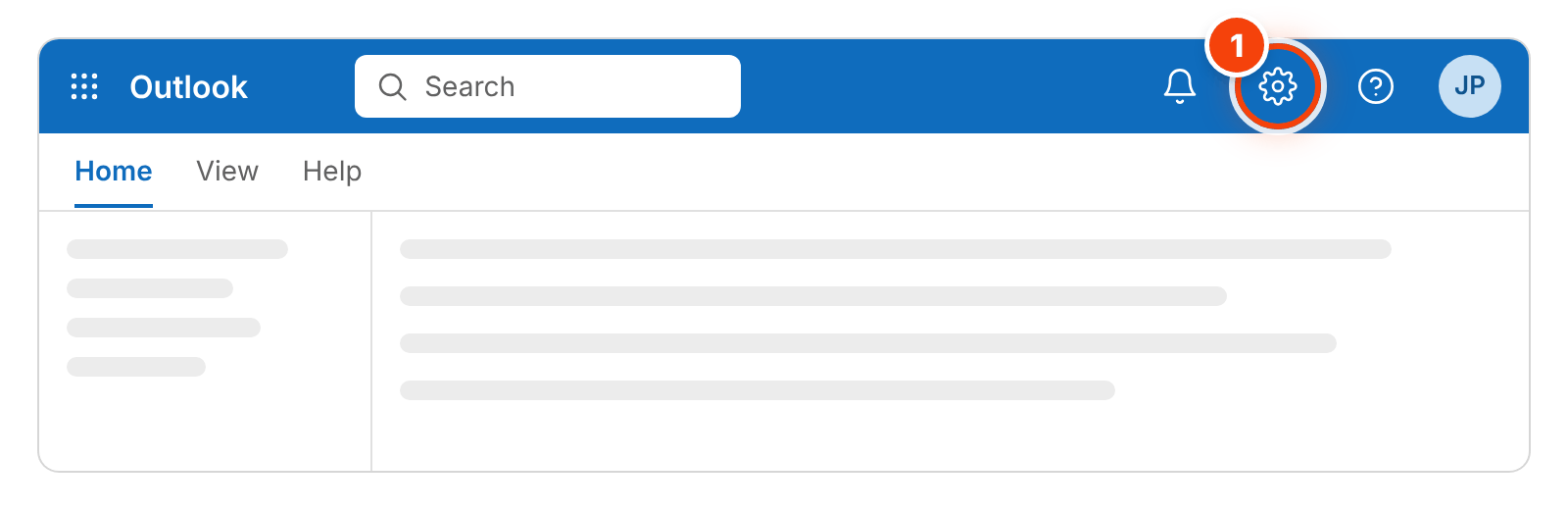
Open Outlook's settings
Open Outlook and sign in with your @ushadvisors.com login. If you land in your inbox, click the gear at the top right.
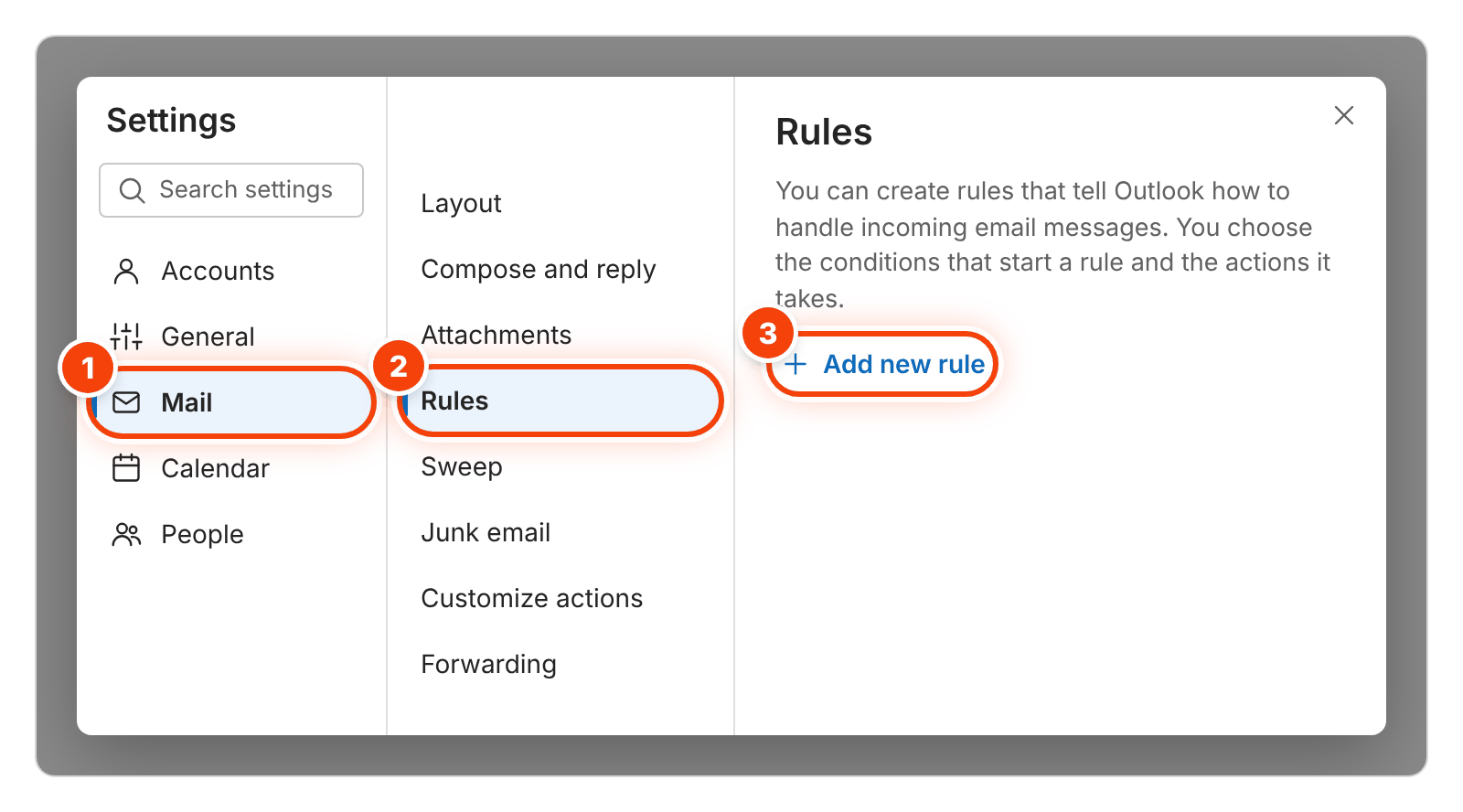
Mail, then Rules, then Add new rule
In Settings, click Mail on the left, then Rules in the middle, then + Add new rule. Click nothing else. If Rules is gone from the middle, click Mail again.
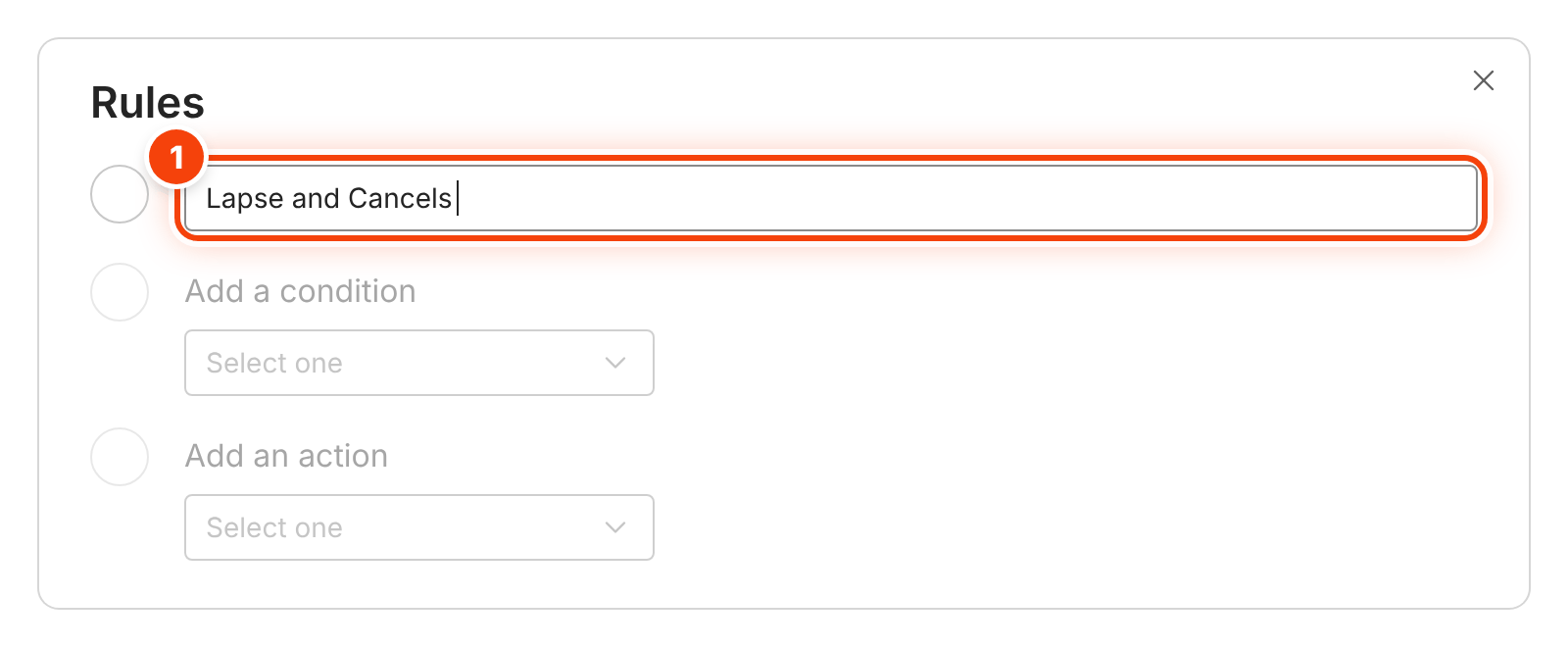
Name the rule
NameLapse and CancelsClick in the top box and paste. Then go straight on to Add a condition, right under it. Don't press + Add new rule again: that starts over.
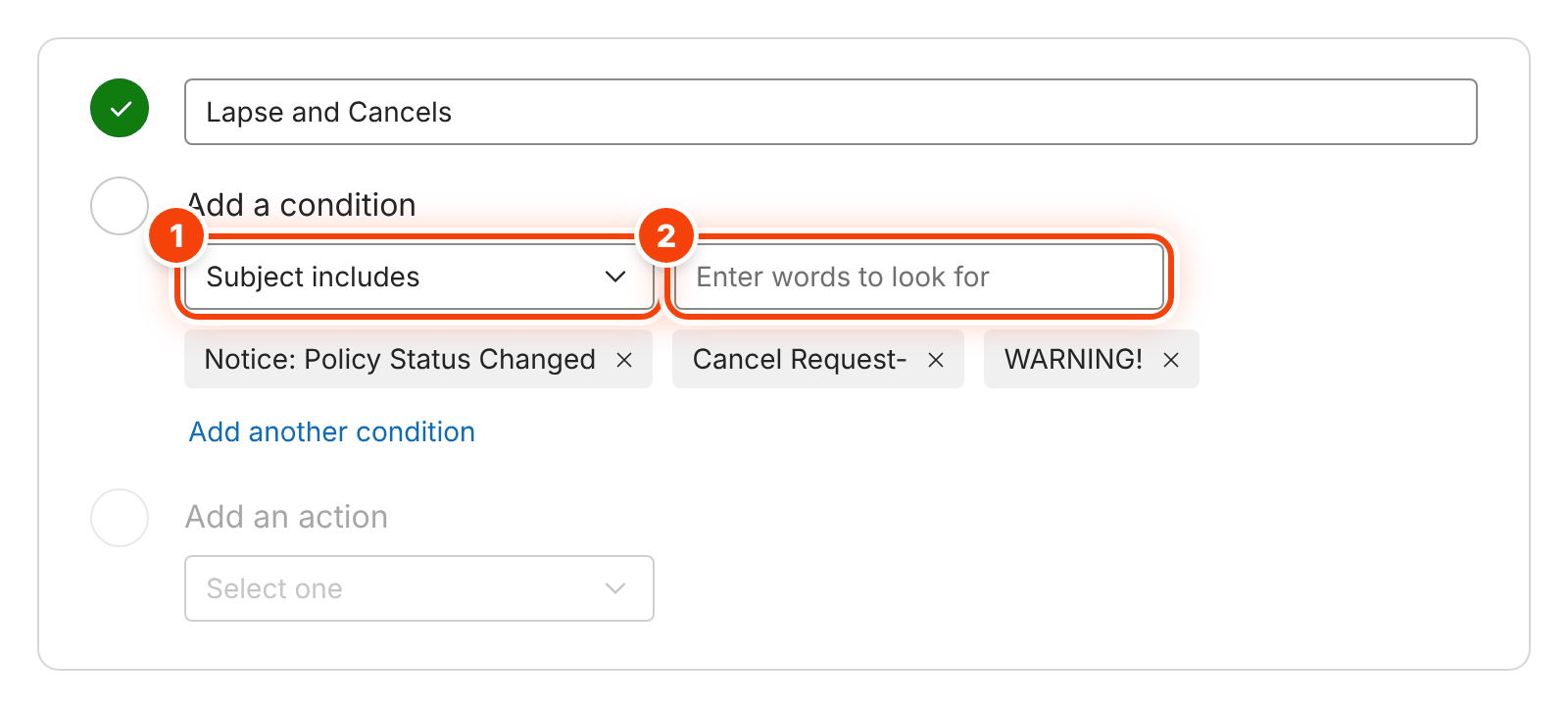
Add the 3 subject phrases, one at a time
Under Add a condition, open the box and pick Subject includes (circle 1). Then for each phrase below: press its Copy, click in Enter words to look for (circle 2), paste, and press Enter. Each one turns into a gray bubble. You end with 3 bubbles.
- Phrase 1 of 3
Notice: Policy Status Changed - Phrase 2 of 3
Cancel Request- - Phrase 3 of 3
WARNING!
- Phrase 1 of 3
Forward to your Afterclose notices address
Under Add an action, pick Forward to (circle 1). Copy the address below and paste it in the box beside it (circle 2). If a list opens under the box, click the address in it.
Your notices addressYour notices address is on the Carrier notices pageUse only this address. It starts with notices-. Not your @ushadvisors.com email, and not your own Afterclose address ().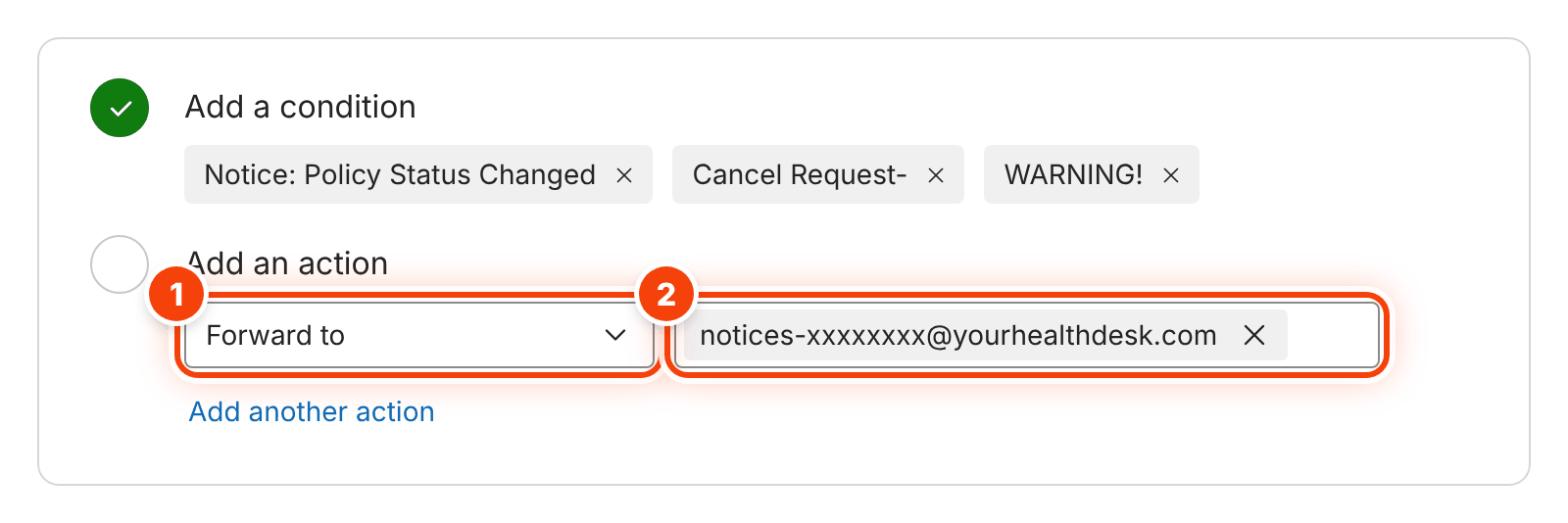
Save
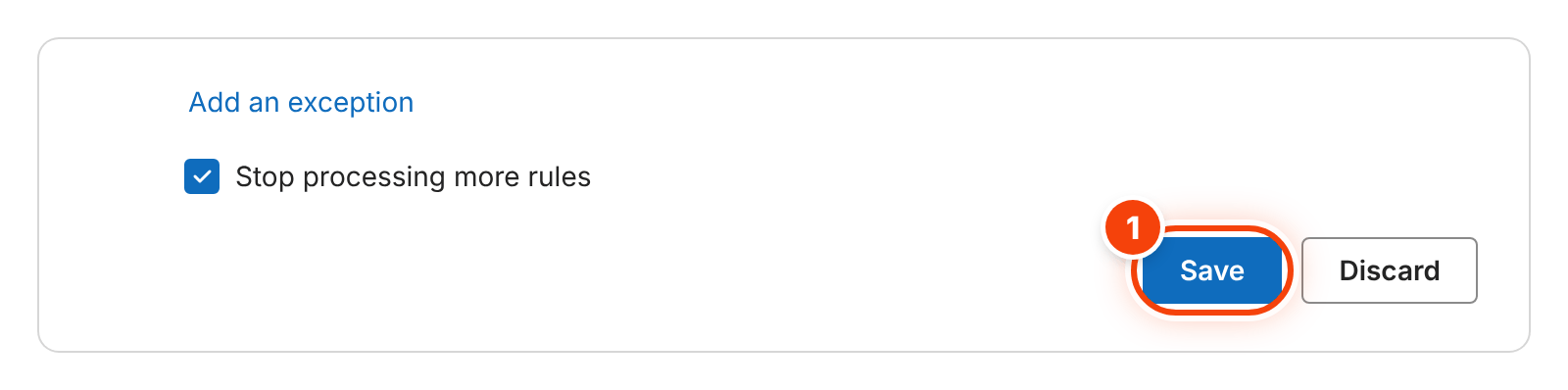
Click Save at the bottom. The rule works from then on. The finished rule looks like the second picture.
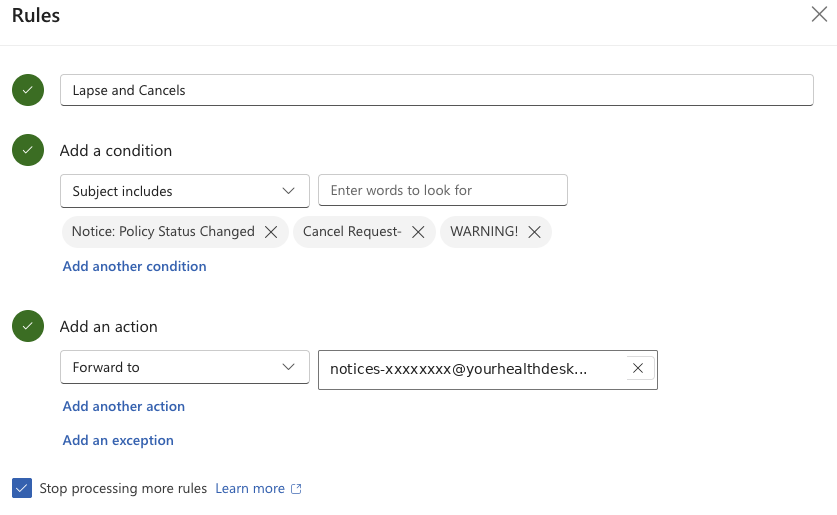
The finished rule. Test it: email yourself
In Outlook, press New mail. Send it to your own @ushadvisors.com address with this subject. Write anything in the body.
SubjectWARNING! Afterclose testYour new rule forwards it to Afterclose. It shows up below in a minute or two. A test never goes to a client.
Afterclose checks for your testWaiting for your test email
Let referrals book onto your Google Calendar.
They pick a time you're free. It lands on your calendar. They get a text confirming it.
Turns on: referrals booking calls with you.
 Google Calendar
 Verified appWeek of Nov 2
Google shows its own sign-in screen, then brings you straight back to this step. Leave every box checked. You finish setting it up right here.
- Afterclose sees only when you're busy, never what your events are
- It adds only the calls people book
Log in to Afterclose first, then connect your calendar here.
Get your business texting number.
The carriers register every business that texts under its EIN. It's all on this screen, in 5 parts. Upload your IRS EIN letter and Afterclose fills in most of it.
Turns on: texting your clients from your own business number.
Pick your number
Upload your IRS EIN letter
The CP 575 the IRS mailed you, or a 147C. A PDF or a photo, up to 4 MB.
Your business
Last step: the extension that keeps your book current.
It runs in Chrome on your computer. Once a day it reads your own USHA sales report and sends your policies to Afterclose. You never upload anything. 5 steps, about 3 minutes.
Turns on: the coverage guide, day 7, day 14, payment reminders and missed payment emails.
Download it and unzip it
Windows: right-click the downloaded file, choose Extract All, then Extract. Mac: double-click it.
Move the afterclose-book-sync folder somewhere it can stay, like Documents. Chrome runs it from that folder, so don't delete it.
Load it into Chrome
Copy this, paste it in Chrome's address bar and press Enter:
chrome://extensionsTurn on Developer mode at the top right (circle 1). Click Load unpacked (circle 2), pick the afterclose-book-sync folder and press Select Folder.

Pin it to your toolbar
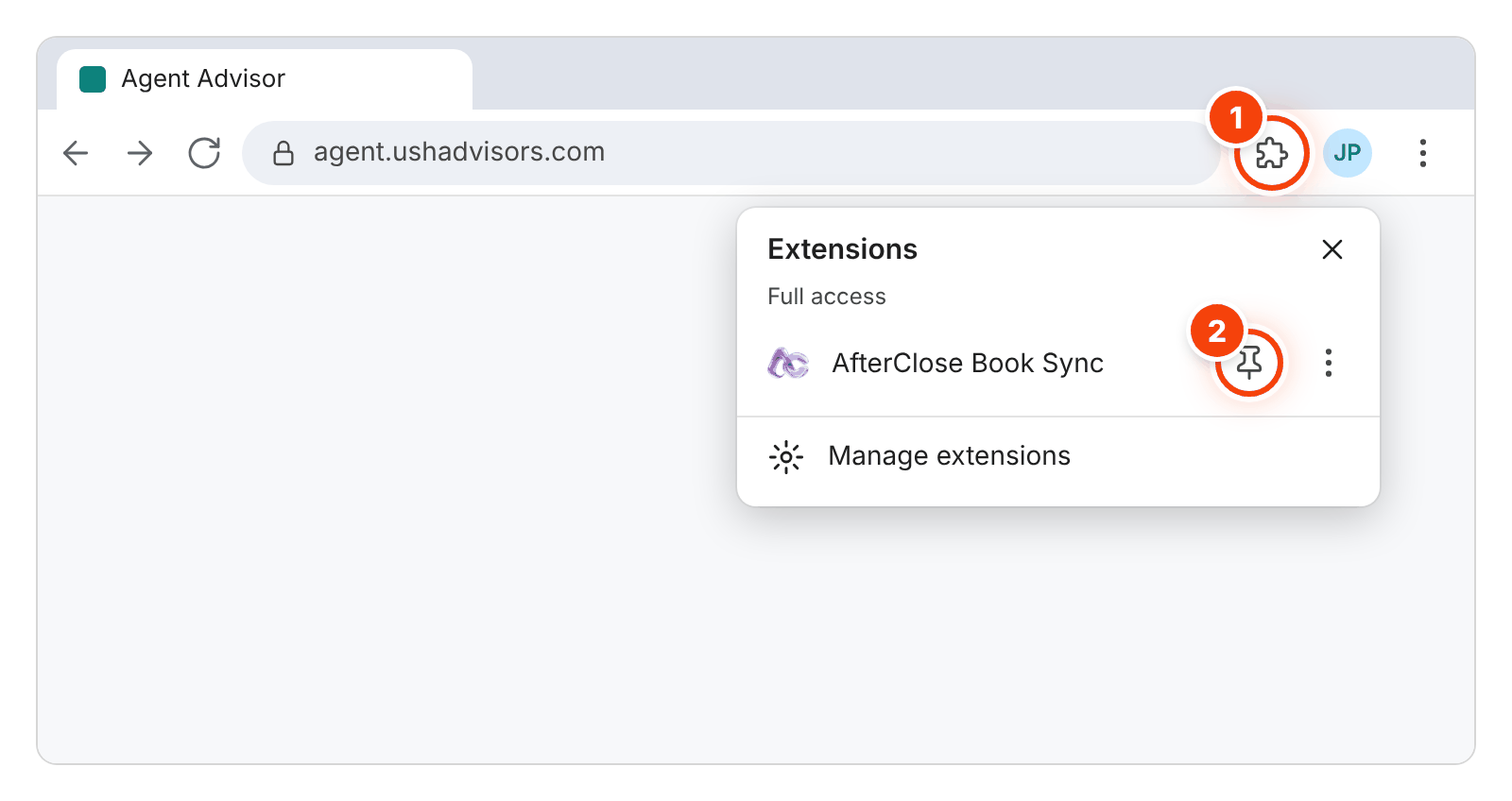
Click the puzzle piece next to the address bar (circle 1), then the pin next to AfterClose Book Sync (circle 2). Its icon stays in your toolbar.
Get your sync key and copy it
The key ties the extension to your Afterclose account. Get it here, then press Copy key.
Paste the key into the extension
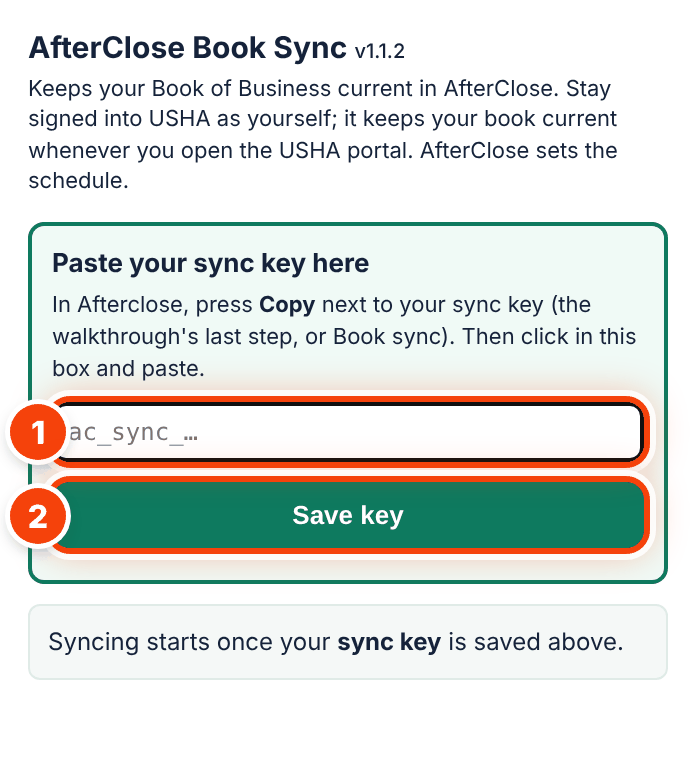
Click the Afterclose icon in your toolbar. Click in the box (circle 1) and paste: Ctrl+V on Windows, ⌘V on a Mac. It saves by itself (or press Save key, circle 2). It then says Key accepted with your name.
When it opens 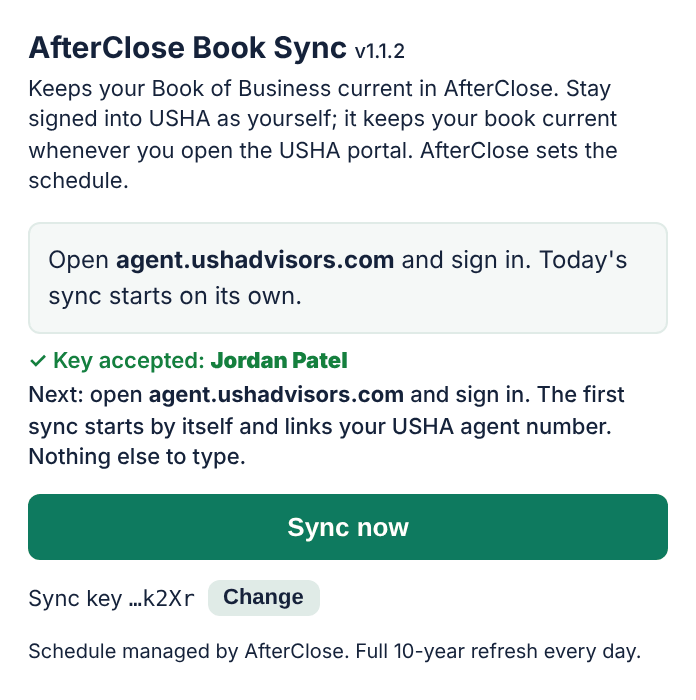
After you paste Last, open agent.ushadvisors.com and sign in. The first sync starts by itself and links your USHA agent number. Nothing else to type.
Safe
- Reads only your sales report page
- Never sees your password
Yours only
- Sends only your own policies
- No other agent can see your book
Protected
- Stored on AWS under a signed BAA
- Encrypted, every access logged
 HIPAA · BAA signed with AWS
Encrypted