 Afterclose
Clients
Associations in force
 This is the birthday section. It shows today’s birthdays for your clients who are in force or pending lapse, and for their spouses. Spouses are in orange.
| Age today | Name | Phone | People on the plan |
|---|
No birthdays today
Nobody in force or pending lapse, and no spouse, has a birthday today.
| Client | Group | Products | Monthly | Latest app |
|---|
No clients yet
Upload your book to see your clients here.
Taken rate
Left out of the rate
This program year, both linesEvery policy, counted once
The rate counts health apps by the month they were submitted, three months behind, the way USHA's report does. UW apps for clients over 49 and anything that is not a health plan are left out. Once a policy is placed it stays taken, even if it cancels or lapses later.
Team taken rates
YTD and 3-Mo Rolling are USHA's figures: health apps by the month they were submitted, three months behind. Real is every decided app this program year, no lag. Pending apps are not in any rate. Click an agent for their full Taken rate page.
Inbox
Write it once, then choose who gets it: people you pick, or groups by status, product and more.
Recommended
Ready to use. Change anything before it goes.Your campaigns
Who gets it
A client is in when one of their policies matches every date, status and plan type you pick.
Policy status
Plan
Referrals
State
Message
Drag a picture to move it, or use Up and Down. Pictures are public on the web: never one with a client's details. Keep plan, health and claim details out of email.
One picture at most. Pictures are public on the web: never one with a client's details. Every text ends with your company name and the opt-out line.
Recipients
0Preview
Send
Recipients
The email
Message
Who gets it
Someone is included when one of their policies matches every status, product and line you tick, and they are in one of the groups and states you tick. People you pick from Clients are always included.
Picked by hand
Group
Status
Product
Line
State
Recipients
0Tick a group, status or product, or pick people from Clients.
Preview
Drafts
Coming up
Dates are worked out from rules each yearReferrals
Friends who asked you to reach out, from your page or a client's personal link. You reach out yourself: nothing automatic ever starts from this list.
Your referral page
Open itYour photo, your name and a short form: the friend types their own first name and mobile and agrees to calls and texts from you. It is in your Day 14 email, and you can text it or put it anywhere. Change the address in Profile.
Your clients' personal links
Each client in force has their own link. A friend who opens it sees your card and the client's first name, nothing else about them. Open a client to copy their link or send it from your own phone. Afterclose sends nothing.
Who was sent your way
No referrals yet
When someone fills in your page, they show up here.
Carrier notices
Forward the insurance company's emails about your clients (a returned payment, a cancel request, a status change) to your private Afterclose address. Each one is read, matched to your book, and the right email is proposed. Nothing is sent without you.
Your notice address
Private to you. Only notices from ushealthgroup.com or ushadvisors.com are believed.Set it up once in Outlook (two minutes)
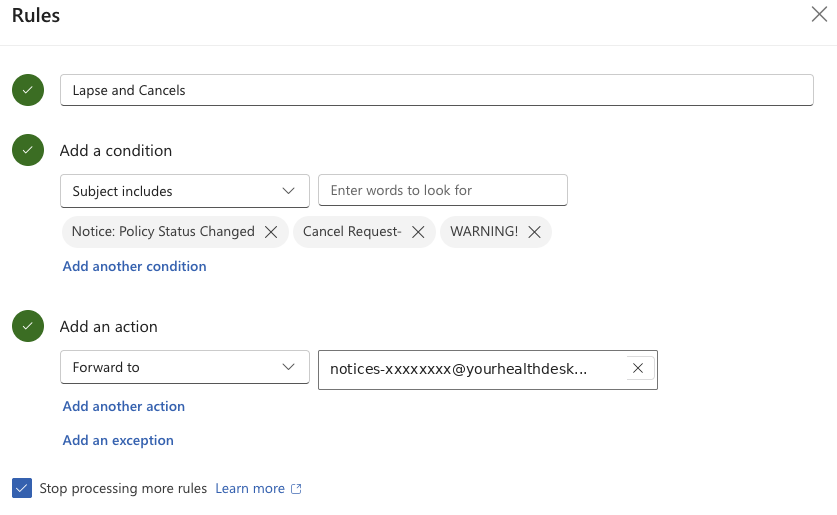
- Open your email: outlook.cloud.microsoft/mail.
- At the top right, click the Settings gear, then Rules, then + Add rule.
- Name the rule Lapse & Cancels.
- Under Add a condition choose Subject includes, then paste each of these and press Enter after each one:
Notice: Policy Status ChangedCancel Request-WARNING! - Under Add an action choose Forward to and paste your notice address from above (it starts with notices-).
- Press Save. Make sure the rule's switch is on. Done: from now on every lapse, cancel and status notice lands here by itself.
Gmail instead? Make a filter for mail from ushealthgroup.com that forwards to the address above. Gmail emails a confirmation code to it; the code shows up below as Gmail forwarding confirmation.
Addresses allowed to forward
Your login address is always allowed: . Add the mailbox the notices come from (your company address, your Gmail). A notice from any other address is held until you say it is yours.
What came in
No notices yet
Forward one from the insurance company and it shows up here, read and matched to your book.
Texting
Text your clients from your own business number, and set that number up.
Recommended
Ready to use. Change anything before it goes.Your text campaigns
Google reviews
See your Google reviews, thank people for them, and share your review link.
Connect your Google Business Profile
Sign in with the Google account that manages your profile. You can disconnect any time.How Afterclose uses it:
Don't have a Google Business Profile yet? Here is how to make one, step by step.
Which profile is yours?
This Google account manages more than one profile. Pick the one clients review.Send the review link to every client the same way. Google does not allow asking only the happy ones, or giving anything in return for a review.
Reviews
Prezi and Vcall emails
Upload the client’s coverage summary. Afterclose fills in the email with your name, NPN and photo. You check it, then press Send. It goes from your own Gmail.
Your Gmail
Connected1Which email
Pick one to start.
2Their Health Coverage Summary
Upload the Health Coverage Summary PDF. Afterclose reads the monthly amount, who is covered and the state they live in.
3The client
4Next appointment
4Verification call
5Attachments
6Check it, then send
Your licenses
Upload each state license once (a PDF or a photo). Afterclose reads its expiration date and offers it on every email to a client in that state.
Prezi emails
Every Prezi email you sent a client. Set where each one stands; a Vcall email to the same address marks it Sold by itself. Only you see this.
Vcall emails
Your website
Tell us about you once. We build your own website on your own domain.
Your own website, built for you
Fill this in, add your logo and headshot, and send it in. Your site gets your name, your story, your booking button and your referral page, on your own domain.
Your website is done
Website requests
Only you see this. Put agents on Pro, open what they sent, and mark a site done when it is live.Put someone on Pro before they sign up
Set up booking in 3 steps
Your referral page gets a second step where people pick a time for a call. It takes about two minutes.
- 1Connect Google
- 2Pick calendars
- 3Set your hours
Connect your Google Calendar
Google asks you to sign in and allow Afterclose. You can disconnect any time.How Afterclose uses each Google permission:
- Your email address: shows which Google account is connected.
- Your list of calendars: you pick which calendars mean you're busy and which one booked calls go on.
- Your free and busy times: your referral page offers only times you're free. Afterclose never reads your event names, guests or notes.
- Events on calendars you own: each call someone books is added to the calendar you picked, and Afterclose only changes events it created.
Which calendars mean you're busy?
Check every calendar that has things you'd show up for. A meeting added to one of these closes that time right away.When can people book?
Pick the days people can book, then the hours. A day left off can’t be booked.Right after they send the form
When they book a time
The first text has to name your business and say how to get help and how to stop. The second doesn't. Texts start once your texting number is approved.
What your referral page says
The paragraph under the headline on your page and on every client link. Change it any time.Booked calls
Also on your Google Calendar, with the person's note.Upload a book
A client file from USHA, in the template's columns. The first upload sends nothing to anyone.
Whose book
Your book
What this file does
Adding writes the clients and policies as the starting point. No email or text starts from it.
Recent uploads and syncs
Book sync
The USHA browser extension sends your sales report here once a day: new sales and every status change, from pending to in force to lapsed. Your key was made with your account; this page can make a new one.
The extension
AfterClose Book Sync runs in your Chrome. Download the newest version here; you install it yourself in a minute.
How to install it the first time
- Download it and unzip it. Move the afterclose-book-sync folder somewhere it can stay, like Documents (not Downloads).
- In Chrome, open chrome://extensions and turn on Developer mode (top right).
- Click Load unpacked and pick the afterclose-book-sync folder.
- Click the puzzle piece next to the address bar, pin AfterClose Book Sync, open it and paste your sync key.
How to update it: 5 steps, about 2 minutes
Download the new version
Click the button. A zip file lands in your Downloads.
Unzip it
Windows: right-click the zip file, choose Extract All, then Extract. Mac: double-click the zip file.
You now have a folder called afterclose-book-sync. On Windows it is inside a folder with the version number in its name.
Put it where the old one is, and replace it
Drag the new afterclose-book-sync folder into the folder that has the old one. Most people keep it in Documents.
Your computer asks what to do because a folder with that name is already there. Mac: click Replace. Windows: click Replace the files in the destination. Don't pick Keep Both or Skip.
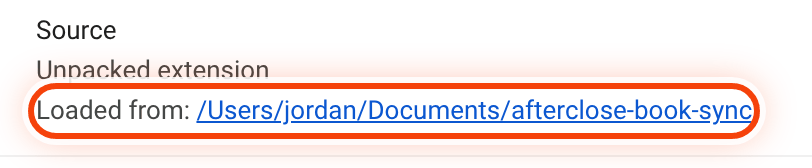
Not sure where the old one is? Open Chrome's extensions page (step 4 shows how), click Details on AfterClose Book Sync, and look at Loaded from. That is the folder to replace.
Reload it in Chrome
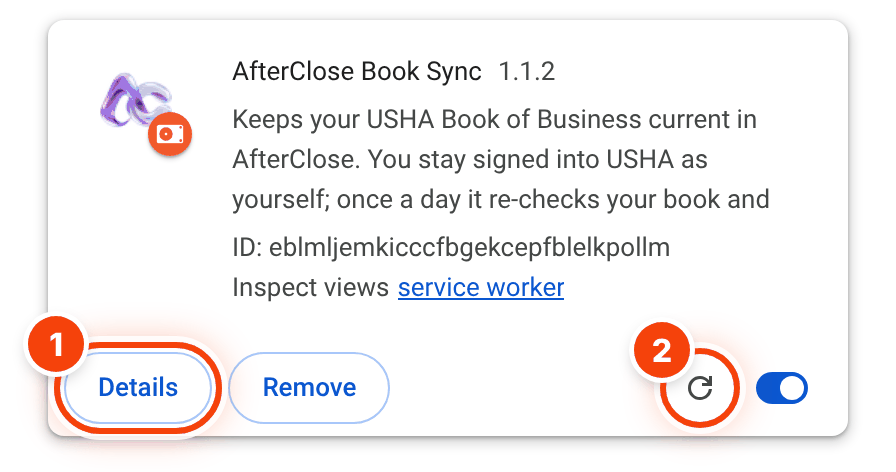
Copy this, paste it into Chrome's address bar and press Enter:
chrome://extensionsOn the AfterClose Book Sync card, click the round arrow (circle 2). Circle 1 is the Details button from step 3.
Check that it worked
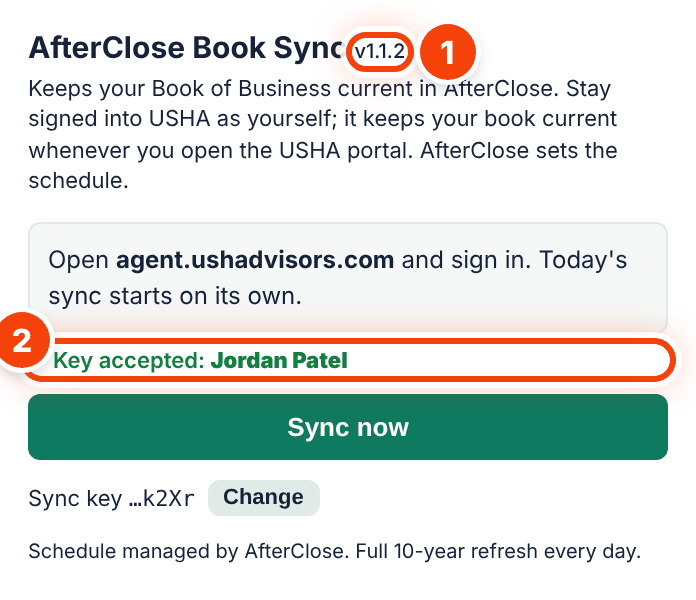
Click the AfterClose icon next to Chrome's address bar. The top says v1.1.2 (circle 1), and under it it says Key accepted with your name (circle 2). You're done.
Your sync key stays the same. You don't need a new one.
You on USHA
Keys
Last sync
Open UploadHow it works
- Download the extension above and install it. Paste the key from your sign-up into it, or make a new one here. The extension shows whose key it is.
- Open USHA's Agent Advisor site. The first time, the extension saves your USHA agent number and name from your USHA login; the name has to be yours.
- Once a day the extension sends your whole sales report.
- New clients and status changes appear in Clients. Rows that need you are listed under Upload.
Nothing a sync brings in sends an email or a text.
Profile
Your signature on every email: your photo, your name, how to reach you and your Google reviews.
Your details
Your headshot
Your sending
Test modeInbox alerts
The email goes to the address you log in with. It shows who wrote and what they said, and you can press Reply in that email to answer them from your Afterclose address, in the same thread.
Your referral page
Open itYour signature
Exactly as it appears under every email Afterclose writes for you.
Agents
Everyone on Afterclose. Opening an agent's book is logged and the agent can see it.
Sending to clients
OffOff means nothing reaches any client, whatever else is set. On lets live agents' emails go: the welcome, Day 7, Day 14 and the payment reminders for policies that go in force after they went live, and the carrier-notice emails for live notices. Every email still passes each client's own doors: an email on file, no unsubscribe, every fact present, the daily cap.
| Agent | Address | Mode | Profile | Billing | Clients | Policies | Joined | Last upload | Sync |
|---|